
A store can’t afford to break. Our WooCommerce maintenance service keeps yours updated, backed up and safe. We test your checkout after every update, so you keep selling.
12+
Years of WordPress work
120+
Clients Served
150+
Sites launched
40+
Live sites we look after
A store has more moving parts than a normal site. Pick the risk that worries you most to see how we handle it.
An update breaks the checkout, and you lose sales until someone notices.
We test add-to-cart and checkout after every update, for each way to pay.
A backup from last night doesn’t include today’s orders.
We set up backups that protect your orders, not just your pages.
A payment plugin update stops card payments without warning.
We watch payment updates closely and test them before they go live.
Your shipping, tax or product plugins stop working together.
We check plugins work together after each update and fix clashes fast.
Your store gets slower as orders and products pile up.
We clean your database, tune your store and check speed every month.
Stores hold customer data, so hackers target them more.
We scan for threats, keep everything up to date and lock down logins.
Your store plan covers the jobs that keep it selling. Here’s what that looks like.
checks on every store plan
WooCommerce, WordPress, theme and plugin updates, tested before they go live.
Add-to-cart and checkout tested for each way to pay after every update.
Backups that protect your orders and customer data, kept off your server.
Order and shipping emails checked so they still send.
Malware scans, a firewall and login protection.
We watch your store around the clock and act fast if it goes down.
A short report on what we did and what we suggest.
We keep these stores and sites updated, backed up and safe, month after month.

An online store for a brand that sells custom and road-legal number plates for cars, motorbikes, vans and more.

A WordPress site for a doctor-led, CQC-registered hair and skin clinic. Patients can explore treatments and book a free online assessment.
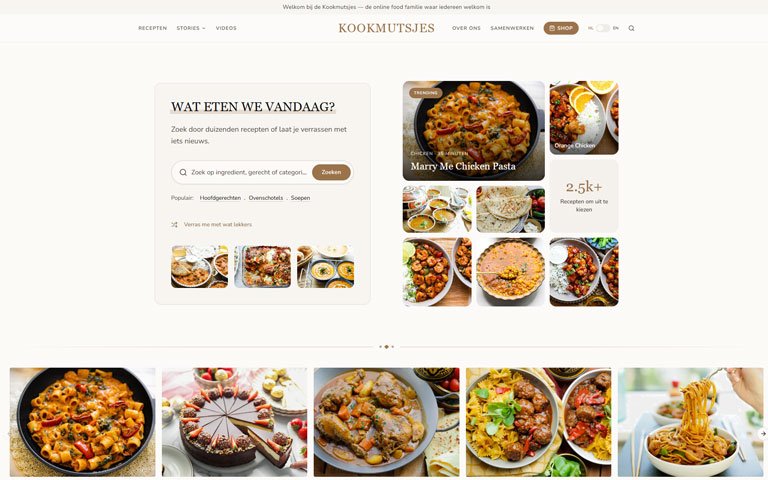
A WordPress site for a popular food brand, with over 2,500 recipes, cooking videos and handy kitchen tools in Dutch and English.

A WordPress site for a building safety firm that covers fire, smoke vents, electrical and security work, with quick quote and survey requests.

A WooCommerce store for a maker of range hoods and home fans, with a parts shop, dealer finder and product registration.

A WordPress site for a Gas Safe registered heating firm, with a simple form for free boiler and heating quotes.
We treat your store like a shop, not just a website. If it can’t take orders, it’s our top priority.
Checkout first
Every update is followed by a full checkout test.
Order-safe backups
Your orders are protected, not just your pages.
Real people
You talk to the team that knows your store.
Fast fixes
A broken checkout is always our top priority.
Stores we didn't build
We take on stores built by others, after a full health check.
No lock-in
Simple monthly plans you can change or cancel.
Moving your store onto a plan is simple. Here's how it works.
Pick the store plan that fits, or ask us to help you choose.
You give us safe access to your store and hosting.
We check updates, backups, checkout, plugins and speed.
We fix urgent issues and set up backups, tests and alerts.
We look after your store each month and send a short report.
Most stores are set up within a few working days. Bigger fixes from the health check are quoted first.
Every plan comes with the standard items. Bigger jobs are priced on their own, so there are no surprises.
Tested updates
WooCommerce, WordPress and plugins
Checkout tests
Each way to pay, after every update
Order-safe backups
Kept off your server
Security scans
Malware checks and firewall
Small fixes
Up to the time in your plan
Monthly report
What we did and what we found
New features
Custom store features
Store redesign
A new look for your store
Malware clean-up
If your store is hacked
Speed project
Deep cart and checkout tuning
Product uploads
Adding large product lists
Moving hosts
Moving your store to a new server
Store care works in layers. Pick a layer to see what we look after.
Updates tested on a copy first, then applied at quiet times.
Add-to-cart and checkout tested for each way to pay.
Backups that protect your orders and customers, kept off your server.
Malware scans, a firewall, strong logins and safe user roles.
Round-the-clock watch, with alerts the moment your store goes down.
No plan can make a store 100% problem-free. But regular care cuts the risk a lot. And if something breaks, a broken checkout is always fixed first.
Pick the plan that fits your store. You can change it at any time.
Best for
Stores with a small range and steady orders.
How scope is set
A set monthly price, no surprises.
Upfront certainty
Room to change
Choose it when
You want updates, backups and checkout tests sorted.
Best for
Stores taking orders every day.
How scope is set
A set monthly price, no surprises.
Upfront certainty
Room to change
Choose it when
You want faster help and more fix time.
Best for
Stores that need regular changes and new features.
How scope is set
A set monthly price, no surprises.
Upfront certainty
Room to change
Choose it when
You want care plus ongoing work on your store.
Raise a request by email or through your client area. We sort it by how much it affects your sales.
Bigger jobs, like new features, are quoted first. You approve the price before we start.
Explore WooCommerce DevelopmentCan't see your question here? Send us a message and we'll get back to you with a clear answer. You can also browse our recent projects or see all our WooCommerce services.
A store takes orders all day. So backups must protect orders, and every update needs a checkout test after it. For sites without a shop, see our WordPress maintenance plans.
Yes. Our store backups protect orders and customer data, not just your pages.
Yes. We test updates on a copy first, then apply them at quiet times.
We keep track of them and remind you before they run out.
Yes. We start with a full health check, then add your store to a plan.
It depends on the size of your store and how much fix time and support you need. You get a fixed monthly price before you sign up.
Yes. Small speed fixes can be part of your plan. For a slow store, we start with full WooCommerce speed optimisation.
We clean it first as a separate job with our WordPress malware removal service, then add it to a plan to keep it safe.
Further reading: How to update WooCommerce (WooCommerce.com)